Butterfly Layered Papercut: DIY Spring Crafting with SVG Files
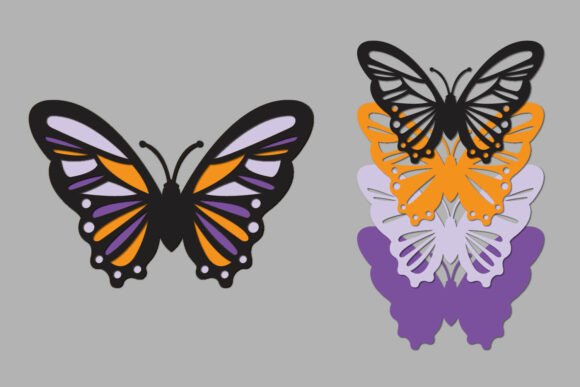
Capturing the essence of spring in a tangible, layered form brings a unique sense of satisfaction to any crafter. The Butterfly Layered Papercut design represents a beautiful intersection of digital precision and physical artistry. Unlike a static image, this design relies on dimensionality; it is constructed from multiple distinct planes that, when stacked, create a shadow box effect. This method transforms a flat sheet of paper into a three-dimensional object, mimicking the delicate, fluttering nature of a butterfly’s wings. The visual appeal lies in the depth and the play of light and shadow across the layers, offering a sophisticated yet whimsical aesthetic that suits the season perfectly.
This particular digital asset is engineered for versatility. Delivered as an instant digital download, the package includes a comprehensive zip file containing SVG, DXF, EPS, AI, and PNG formats. This variety ensures compatibility with nearly every cutting machine and design software on the market, from Cricut and Silhouette to professional Adobe Illustrator setups. The files are optimized for a standard 6-inch average size, though the height varies slightly to accommodate the specific morphology of the butterfly model. This adaptability is crucial for crafters who wish to scale the design for different project scopes, whether creating a small embellishment for a greeting card or a statement piece for wall art.
Visual Characteristics and the Spirit of DIY
Visually, the Butterfly Layered Papercut design is a masterclass in structural simplicity. It does not rely on overly complex filigree that might jam a cutting machine; instead, it uses clean, flowing curves that suggest the natural veins and patterns of a butterfly wing. The "DIY Spring" aspect is evident in the organic lines and the potential for vibrant color play. Because the design is layered, you have the freedom to choose a different color for each tier. A popular technique is to use a gradient effect, moving from a deep violet on the bottom layer to a soft lavender on the top, or perhaps a pastel green to yellow to mimic the budding flora of the season.
The personality of this design is approachable and joyful. It does not carry the stiff formality of a corporate logo or the rigid geometry of a technical blueprint. Instead, it feels artisanal. When assembled, the layers create a distinct "lift" that makes the butterfly appear to hover above its background. This tactile quality makes it an excellent candidate for mixed-media projects. You might combine the paper layers with vellum for translucent wings or use textured cardstock to add a sensory element to the visual display. The design invites experimentation, encouraging the maker to step away from the screen and engage with the physical materials.
Practical Applications for Modern Creators
For designers, entrepreneurs, and content creators, the applications of the Butterfly Layered Papercut extend far beyond a simple hobby project. In the realm of brand identity and packaging design, a layered element can add a premium feel to product presentation. Imagine a boutique skincare brand using a small, layered butterfly seal on their gift boxes; it signals attention to detail and a commitment to quality that a flat sticker cannot match. Similarly, for editorial design, this asset can be photographed to create unique hero images for blogs and social media, offering depth and texture that flat graphic design elements often lack.
Small business owners, particularly those in the stationery or event planning sectors, will find this asset invaluable. It serves as a template for creating intricate wedding invitations, baby shower decorations, or spring-themed marketing collateral. The scalability of the SVG and EPS files means you can maintain high resolution regardless of the final output size. Whether you are printing a large format poster or cutting a delicate confetti piece, the vector integrity remains intact. This ensures that your final product looks professional, avoiding the pixelation issues often associated with raster-based design assets.
Technical Guidance and Workflow Integration
Before purchasing, it is essential to assess your equipment and software capabilities. While the files are provided in universal formats, the "Butterfly Layered Papercut" project requires a machine capable of handling intricate cuts. If you are using a cutting plotter, ensure your blade is sharp and your mat is sticky enough to hold the cardstock in place during the fine detail work. The file structure is designed for ease of use; however, if you are importing the SVG or DXF into software like Cricut Design Space or Silhouette Studio, you may need to ungroup the layers to manipulate individual colors or adjust the sizing.
Color variation is one of the strongest features of this design. When preparing your files, plan your color palette in advance. Consider the psychology of color in your specific context. For a calming, serene vibe, stick to analogous colors (colors next to each other on the color wheel). For a bold, energetic look, use complementary colors. If you are selling the finished physical product, remember that the digital file is an instant digital download, but the physical item requires material costs and labor. Pricing your finished crafts should reflect the complexity of the assembly and the cost of high-quality cardstock.
Choosing the Right Materials
The success of a layered papercut project heavily depends on the weight of the paper. For the Butterfly Layered Papercut design, a medium to heavy weight cardstock (65lb to 80lb) is generally recommended. Paper that is too thin will not hold the shape and may curl under the pressure of the layers, while paper that is too thick can make the assembly bulky and difficult to adhere cleanly. When gluing the layers, use a precision tip glue pen or double-sided foam tape. The foam tape is particularly effective for this project as it creates additional physical space between the layers, enhancing the 3D shadow box effect.
Commercial Usage and Licensing
For entrepreneurs and small business owners, understanding the licensing of premium fonts and design assets is critical. Typically, digital files like this butterfly design allow for the creation of physical end products. This means you can cut the design and sell the finished paper craft. However, you generally cannot resell or redistribute the digital source files. Always review the specific license agreement included in the zip file to ensure your intended use aligns with the creator's terms. This protects your business from legal issues and supports the original designers who create these high-quality assets.
Ultimately, the Butterfly Layered Papercut DIY Spring design is more than just a file; it is a gateway to creating personalized, high-end crafts. It bridges the gap between digital convenience and the timeless appeal of handmade art. By understanding the technical requirements and embracing the creative possibilities of color and texture, you can produce stunning pieces that capture the renewal and beauty of the spring season.